
A 100-inch screen for the price of a mid-size TV sounds too good to be true. It isn't, once you know which 4K projector actually earns a spot on your wall.
 ★ Our #1 Pick for 2026
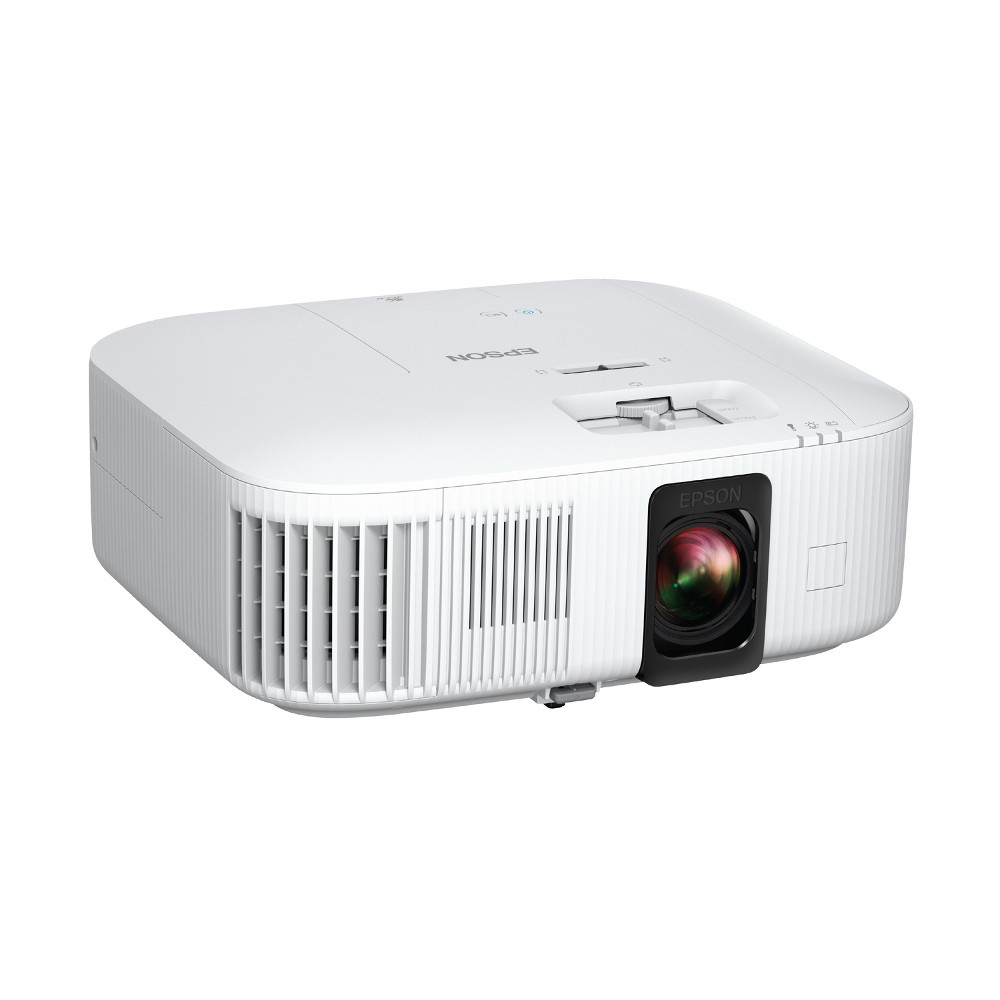
Epson Home Cinema 2350 — Top Pick
Bright, sharp 4K PRO-UHD with Android TV built in, flexible setup, and natural color out of the box, all at a fair price. It's the best value for the vast majority of home theaters, which is exactly why it's our top pick.
In a hurry? That's our pick. Want the reasoning and the full comparison? Keep reading.
You want the big-screen feeling at home. Not a 65-inch TV that looks huge in the store and small in your living room, but a wall-sized picture that makes movie night feel like an event. A good 4K projector gives you that, and it costs less than you think. The catch is that the projector market is a swamp of confusing specs, fake resolution claims, and brightness numbers that mean nothing until you understand them.
This guide fixes that. You'll learn the difference between true 4K and pixel-shift, how many lumens you actually need for your room, why laser beats lamp for most people, and when an ultra-short-throw model makes more sense than a traditional projector. Then you'll get four hand-picked machines for four real situations, so you can stop reading spec sheets and start watching movies.
Key Takeaways
- The Epson Home Cinema 2350 is the best pick for most people: bright, sharp 4K PRO-UHD with Android TV built in at a fair price.
- "True 4K" and "pixel-shift 4K" both look excellent on a big screen. Focus on brightness and contrast before you obsess over the panel type.
- Lumens matter more than resolution in a room with any ambient light. A dim projector in a bright room looks washed out no matter the specs.
- Laser light sources last roughly 20,000 hours and stay bright. Lamps are cheaper up front but fade and need replacing.
- Ultra-short-throw "Laser TVs" like the Hisense PX3-PRO sit inches from the wall, so you get a huge picture with no ceiling mount and no cables across the room.
True 4K vs Pixel-Shift: What Actually Matters on the Wall
Projector marketing loves the word "4K," and it loves to hide what it means. A true native 4K projector uses a chip that physically has 8.3 million pixels. A pixel-shift projector uses a smaller chip and rapidly wobbles the image to place pixels in two or four positions, painting a 4K-equivalent picture faster than your eye can catch. Epson calls its version 4K PRO-UHD. It sounds like a shortcut, and on paper it is.
Here's the honest truth: on a 100-inch screen viewed from your couch, you will not see the difference between good pixel-shift and native 4K. The image is razor sharp either way. What you will see is brightness, contrast, and color accuracy, which is where cheaper "true 4K" projectors often fall apart. So don't let a spec-sheet buzzword steer you. A well-tuned pixel-shift projector like the Epson HC2350 beats a dim native-4K bargain unit every single time.
Where native 4K earns its keep is a dedicated dark room and a picky eye. If you sit close to a very large screen and you want reference-grade detail, a native panel plus a great light engine, like the Epson LS12000, rewards you. For everyone else, pixel-shift is the smart money.
Lumens, Laser, and Throw: The Three Specs That Decide Everything
Brightness is measured in lumens, and it is the single spec most people ignore and then regret. A projector rated around 2,000 to 2,800 lumens looks glorious in a dark room and still holds up with the lamps dimmed and curtains drawn. Try to watch in a bright, sunny living room, though, and any projector will look faded. If your room has lots of ambient light, lean brighter, or choose an ultra-short-throw model with a light-rejecting screen. Match the projector to your room, not to a fantasy of your room.
Next, the light source. Older projectors use lamps, which are cheap to buy but dim over time and eventually need replacing. Laser light sources cost more up front but hold their brightness and typically last around 20,000 hours, which is decades of normal movie nights. Laser also powers on and off instantly with no warm-up. If a projector fits your budget with a laser engine, that is usually the better long-term choice. The Epson HC2350 uses a lamp to hit its price, and that is a fair trade for most families.
Finally, throw distance. A long-throw projector sits across the room or on the ceiling and needs a few meters to fill a big screen, which means running a cable and mounting it. An all-in-one like the XGIMI Horizon Ultra packs the smarts and speakers into one box you can place on a table. An ultra-short-throw "Laser TV" like the Hisense PX3-PRO sits inches from the wall and throws the image upward, so you get a 100-inch-plus picture with no mount and no cables crossing the room. Pick the throw style that fits your space, then compare within that group.
Quick Comparison
| Product | Best For | Type | Light Source | Smart TV |
|---|---|---|---|---|
| Epson Home Cinema 2350 | Best overall value | Long-throw | Lamp | Android TV built in |
| XGIMI Horizon Ultra | All-in-one living room | Long-throw | Laser + LED | Google TV + speakers |
| Epson Pro Cinema LS12000 | Dedicated theater / reference | Long-throw | Laser | None (use a streamer) |
| Hisense PX3-PRO | No mount / UST setup | Ultra-short-throw | Triple laser | Google TV built in |
1. Epson HC2350 — Best Overall Value
Epson Home Cinema 2350
The Epson Home Cinema 2350 is the projector we point most people toward, and it isn't close. It delivers a bright, punchy, genuinely sharp 4K PRO-UHD picture that looks fantastic on a big screen, and it does it at a price around $1,000 that leaves room in the budget for a screen and a good pair of speakers. Epson's color handling is reliable and natural out of the box, so you spend less time fiddling in menus and more time watching.
Android TV is built right in, which means Netflix, Disney+, YouTube, and the rest live on the projector with no separate streaming stick dangling off the back. Setup is forgiving thanks to generous zoom and lens shift, so you don't need a perfectly placed shelf or ceiling mount to get a straight, filled image. It uses a lamp rather than a laser to hit this price, and that is exactly the kind of smart trade-off that makes it the best value for most homes.
Pros
- Bright, sharp 4K PRO-UHD image that looks great on large screens
- Android TV built in, no extra streaming device needed
- Excellent, natural color right out of the box
- Flexible zoom and lens shift make placement easy
- Strong value at around the $1,000 mark
Cons
- Lamp light source dims over time versus a laser
- Built-in speaker is fine but a real sound system is better
- Needs a fairly dark room for its best contrast
2. XGIMI Horizon Ultra — Best All-in-One
XGIMI Horizon Ultra
The XGIMI Horizon Ultra is the projector for people who want everything in one tidy box. It combines a 4K image with Dolby Vision support, a full Google TV smart system, and surprisingly capable built-in Harman Kardon speakers, so you can drop it on a coffee table or shelf and be watching in minutes. Its Dual Light engine blends laser and LED to deliver rich, punchy color with the smooth, comfortable look many people prefer for long viewing sessions. At around $1,500, it packs a lot into one purchase.
This is the model for a real living room, not a blacked-out cinema cave. Auto-focus, auto keystone, and obstacle avoidance mean it lines itself up quickly, which matters if you move it around. You give up some of the ceiling-mounted, cable-run purity of a dedicated theater projector, but you gain simplicity and a genuinely clean setup. If you want one device, minimal wires, and a picture that impresses guests, this is it.
Pros
- True all-in-one: smart OS and good speakers built in
- 4K with Dolby Vision for rich, dynamic HDR movies
- Dual Light laser + LED engine gives vivid, comfortable color
- Fast auto-focus and auto keystone for quick setup
- Clean living-room placement with minimal cables
Cons
- Pricier than a comparable long-throw projector
- Built-in speakers still trail a dedicated sound system
- Best in a room with controlled light, not full sun
3. Epson LS12000 — Best Reference
Epson Pro Cinema LS12000
The Epson Pro Cinema LS12000 is the projector you buy when the room is dedicated and the picture is the point. Its laser light engine delivers deep, stable brightness and superb contrast, and its detailed 4K PRO-UHD image holds up to a critical eye on a very large, close screen. This is reference-grade home cinema, the kind of picture that makes you re-watch films just to see them properly. It sits around $4,499, and every dollar goes into image quality rather than gimmicks.
It also brings HDMI 2.1 with 4K at 120Hz, which makes it a standout for gaming on a giant screen as well as movies. There is no smart OS built in, and that is on purpose: you pair it with your own streamer or receiver so nothing compromises the picture. This is not the pick for a bright living room or a casual setup. It's for the person building a proper theater who wants the best image without stepping into projectors that cost several times more.
Pros
- Laser engine with outstanding contrast and brightness
- Reference-grade 4K PRO-UHD detail on large screens
- HDMI 2.1 with 4K/120Hz for big-screen gaming
- Precise motorized lens with wide shift range
- Long-life laser rated for around 20,000 hours
Cons
- Premium price aimed at dedicated theaters
- No built-in smart OS or speakers
- Overkill for a casual living-room setup
4. Hisense PX3-PRO — Best UST Laser TV
Hisense PX3-PRO
The Hisense PX3-PRO is an ultra-short-throw "Laser TV," and it solves the biggest headache of projector ownership: mounting and cables. It sits on a low console just inches from the wall and throws a huge 4K picture upward, so you get a 100-inch-plus screen without a ceiling mount, without a cable stretched across the room, and without rearranging your furniture. Its triple-laser light source produces a wide, vivid color range that pops, and Google TV is built in for streaming out of the box. It lands around $2,999.
Pair it with an ambient-light-rejecting screen and it holds up in rooms that would wash out a traditional projector, which makes it the closest thing to a giant TV you can get. It is picky about placement, since ultra-short-throw geometry demands a flat wall and careful leveling, but once it's dialed in it is genuinely stunning. If you want big-screen impact without living-room clutter, this is the smart choice.
Pros
- Ultra-short-throw: sits inches from the wall, no mount needed
- Triple-laser color is wide, bright, and vivid
- Handles ambient light better than most projectors
- Google TV built in for out-of-the-box streaming
- Huge 100-inch-plus picture without room clutter
Cons
- Fussy setup: needs a flat wall and careful leveling
- Best results require a dedicated UST screen
- Higher price than a comparable long-throw model
Which Should You Choose?
Building your first home theater on a budget
Start with the Epson Home Cinema 2350 and put the money you save toward a proper screen and a soundbar or speakers. You'll get a bright, sharp 4K picture, built-in streaming, and forgiving setup, which is exactly what a first theater needs. Add a laser projector later if you catch the upgrade bug.
You want one clean box in the living room
Choose the XGIMI Horizon Ultra or the Hisense PX3-PRO. Go XGIMI if you want a movable all-in-one with speakers you can place on a table. Go Hisense if you want a giant, TV-like picture that stays parked on a console with no mount and no cables crossing the room.
You're building a dedicated dark-room theater
The Epson Pro Cinema LS12000 is the target. Its laser engine, deep contrast, and HDMI 2.1 gaming support give you a reference picture in a controlled room. Pair it with your own streamer and receiver so nothing dilutes the image quality you paid for.
Ready to Put a Cinema on Your Wall?
You don't need to decode another spec sheet. The Epson Home Cinema 2350 gives most people a bright, gorgeous 4K picture with streaming built in, at a price that leaves room for a screen and sound. Check the current price and start building your big-screen home theater today.
Explore Brainstamped's Free ToolsFrequently Asked Questions
It produces a 4K-equivalent picture rather than using a native 8.3-million-pixel chip, but on a big screen from normal seating distance you won't see the difference. A well-tuned pixel-shift projector like the Epson HC2350 looks razor sharp. Brightness and contrast matter far more than the panel type for real-world image quality.
For a dark or dim room, roughly 2,000 to 2,800 lumens looks excellent. If your room has meaningful ambient light, lean brighter or choose an ultra-short-throw model with a light-rejecting screen. A dim projector in a bright room looks washed out no matter how good its other specs are, so match brightness to your actual space.
Laser light sources hold their brightness, power on instantly, and typically last around 20,000 hours, so they're the better long-term choice if your budget allows. Lamps are cheaper up front but fade and eventually need replacing. The Epson HC2350 uses a lamp to hit its price, which is a fair trade for most families.
An ultra-short-throw "Laser TV" like the Hisense PX3-PRO sits inches from the wall and throws the image upward, so you get a huge picture with no ceiling mount and no cable running across the room. It's the closest thing to a giant TV, and paired with a light-rejecting screen it handles ambient light well.
A smooth white or gray wall works to start, and it's a great way to get going cheaply. A dedicated screen noticeably improves brightness, contrast, and color, and ultra-short-throw models especially benefit from a matched light-rejecting screen. Begin on a wall if budget is tight, then add a screen when you're ready to level up.